When something breaks on site, the fix gets most of the attention, but it's rarely where things go wrong. What's just as critical is everything around it: who reported it, who picked it up, what got missed between shifts, and how long it sat before anyone acted. In many operations, that whole flow is still held together by paper forms, radio calls, and memory.
A fault gets noticed during a pre-shift, scribbled down, and passed along. By the time it reaches maintenance, the context is often gone. And the same issue can show up again a week later.
The solution can often be as simple as a work order app to tighten that loop. The primary purpose of a work order app is to make it easy to raise an issue on the spot, attach a photo, assign the job, and track it through to completion. But not every industry has the same needs and depending on your operations, the features and modules that matter most will vary significantly.
KEY TAKEAWAYS:
- Choosing the right work order app starts with understanding how work flows across your operation.
- The requirements for a work order app vary by industry, depending on equipment, pace, and type of work.
- Strong visibility across jobs and statuses allows teams to prioritize work and reduce delays.
- The most effective work order app supports the full workflow, from issue detection to completed maintenance.
What is a Work Order App?
At its core, a work order app is a tool used to create, assign, track, and complete maintenance work. It replaces paper forms, whiteboards, and scattered messages with one system where all work is logged and visible. Instead of writing down an issue and waiting for it to work its way through the system, a work order is created on the spot. It includes what's wrong, where it is, and what needs to be done. From there, it moves through a clear process - being assigned to someone, worked on, and marked as complete.
Most maintenance work order apps also keep a record of what’s been done. Over time, this builds a history of repairs, recurring issues, and equipment performance.
What to Look for in a Work Order App
When you are looking into work order apps, it helps to separate the features to understand what you need and the reason why they are so important for your operations specifically. Whether you are considering a simple work order app for a smaller team or something more advanced to use across multiple sites, the goal is the same: every job logged, tracked and closed out.
Area
What to Look For
Why It Matters in the Field
Work Order Creation
Fast, simple input with minimal fields and photo support
If it takes too long, operators won’t log issues. Problems go unreported.
Tracking & Status
Clear statuses (open, in progress, done) with real-time updates
Teams don’t have to chase updates or guess what’s been handled.
Mobile Usability
Clean interface that works on tablets and phones
Work happens next to machines, not at a desk. It needs to be easy to use anywhere.
Offline Capability
Full functionality without signal (off-line mode) with automatic sync
Many sites have poor coverage. Work still needs to move.
Documentation
Ability to add photos, comments, and notes to each job
Reduces back-and-forth and gives maintenance clear context.
Asset Management
Work orders tied to specific equipment
Builds history and helps identify recurring failures.
Inspections & PM Integration
Issues and deviations from inspections can become work orders instantly
Removes double entry and ensures nothing falls through the cracks.
Setup & Flexibility
Easy to configure templates and workflows
Teams can get started quickly through plug and play without heavy setup or IT support.
Visibility & Reporting
Simple overview of open work, completed jobs, and trends
Supervisors can see what’s happening without digging through systems and chat threads or communication trails.
How to Choose the Right Work Order App for Your Industry
A work order app should reflect the reality of the operation it serves. The pace of work, the equipment involved, and how issues get reported all shape what good looks like in practice and those things vary significantly from one operation to the next.
What matters is understanding where work typically breaks down in your environment, and making sure your maintenance work order app supports that workflow without adding friction.
Aggregates
In aggregates, equipment runs hard and the pressure to keep material moving is constant. The challenge is not just fixing issues when they arise, but catching them early enough to avoid unplanned downtime and stopping the same problems from repeating.
What matters most here is how easily work orders can be created from the field. Operators should be able to flag issues during inspections without slowing down. The handoff to maintenance and service engineers needs to be clean, with enough detail to act immediately. Over time, the system should make patterns visible. Repeating faults, frequent stops, and problem areas need to stand out so teams can move from reactive fixes to planned action.
The most important work order app features for you:
- Work orders created directly from pre-shift and workplace inspections
- Fast reporting with photos and minimal typing
- Clear asset tagging (crusher, screen, conveyor, etc.)
- Recurring issue tracking and history per asset
- Simple status flow (open → in progress → done)
- Offline support across the site
Asphalt, Cement & Concrete
In these environments, timing controls everything. Production schedules are tight, and maintenance has to fit around them. The key need is structure. Work orders should support both planned maintenance and unexpected repairs without creating conflicts. Teams need a clear view of what is scheduled, what is urgent, and what can wait.
Traceability also becomes part of the job. Work often ties into quality, environmental, and operational requirements. Being able to show what was done, when, becomes just as important as completing the task itself.
The most important work order app features for you:
- Preventive maintenance scheduling tied to production windows
- Clear prioritization of planned vs reactive work
- Full work order history with timestamps and actions taken
- Documentation support (checklists, attachments, compliance logs)
- Role-based views for operators, maintenance, and supervisors
- Reporting for audits and internal follow-up
Quarry Operations & OEM Service Operations
Work is spread out across sites, machines, and customers. The challenge is keeping things consistent while still moving quickly. A useful work order setup here makes it easy to capture work in the same way every time, regardless of location. Clear structure helps ensure nothing is missed, especially when different people are involved in the same process.
At the same time, the system needs to stay light enough for field use. Technicians should be able to log work, add context, and move on without getting stuck in admin. The long-term value comes from building a reliable service history that can be used across teams and sites.
The most important work order app features for you:
- Standardized work order templates across sites and customers
- Mobile-first interface for technicians in the field
- Photo documentation and notes attached to each job
- Asset-level service history across locations
- Easy handoff between teams and shifts
- Ability to work across multiple sites without confusion
Not Sure What You Need?
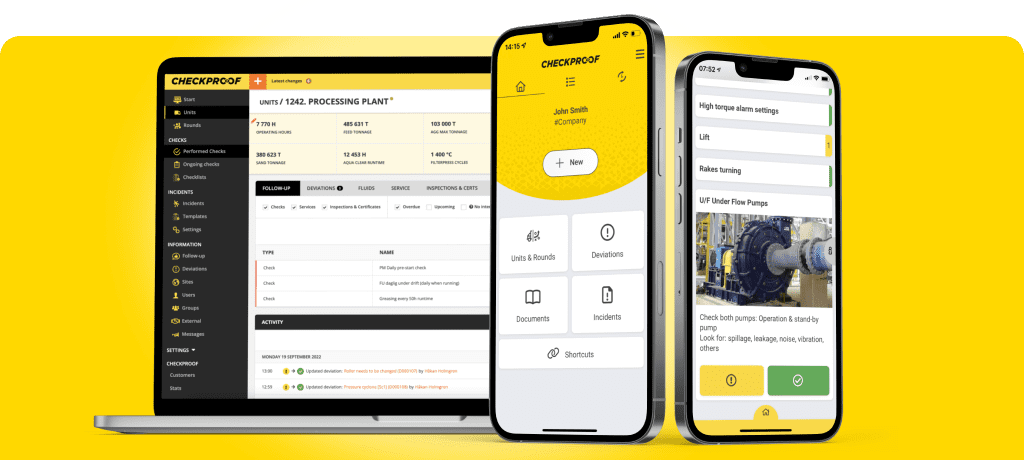
Get in touch with us at CheckProof. We provide a complete operations management platform built for heavy industry, including all features of a work order app. It connects inspections, safety, deviations, and maintenance into one system that actually reflects how work happens on site.
An operator flags an issue during a pre-shift. It becomes a work order instantly. Maintenance gets the full context (photos, notes, asset) and can act without chasing information. The job gets tracked, completed, and logged automatically.
If you need a simple work order app, it delivers that. If you need a full work order tracking app across your operation, it scales with you.
FAQ
Want to know what CheckProof can do for you?
CheckProof's easy-to-use app makes it easier to do the right thing at the right time. Discover how you can run world-class maintenance that is both cost-effective and sustainable.
Book a demo

2026-04-01
How to Choose the Right Work Order App for Your Industry
When something breaks on site, the fix gets most of the attention, but it’s rarely where things go wrong. What’s just as critical is everything around it: who reported it, who picked it up, what got missed between shifts, and how long it sat before anyone acted. In many operations, that whole flow is still held together by paper forms, radio calls, and memory.

2026-04-01
Best Practices for Work Order Management
Efficient maintenance starts with clear work orders. When issues are logged quickly with the right details, photos, and priority, teams spend less time chasing information and more time fixing problems. The result is reduced downtime, smoother shift handovers, and audit-ready operations — even in low-signal or harsh environments where mobile work orders let crews flag issues before they escalate.

2026-03-26
How DAY Group went paperless and transformed maintenance operations with CheckProof
DAY Group Ltd is an independent, family-owned business supplying construction materials and services across the south of England since 1947. Handling over five million tonnes of material annually across divisions including Day Aggregates, Day Glass Recycling, Day Contracting, and Day Equestrian — plus recycling operations processing over 1.5 million tonnes a year — the group operates with close to 200 staff and a large fleet of plant equipment, making uptime, compliance and safety mission-critical.

2026-03-17
CONEXPO-CON/AGG 2026 – CheckProof’s Industry Report
CONEXPO-CON/AGG 2026 highlighted an industry laser-focused on execution: demand is strong, but labor, schedules, and downtime risk remain tight. The goal is clear — repeatable performance, early risk visibility, and simpler tech adoption. This report covers the key signals from the show and what they mean for the next era of construction materials.

2026-02-20
Standortübergreifende Instandhaltung zum Wettbewerbsvorteil machen
Gebr. Arweiler, ein familiengeführtes Unternehmen mit mehreren Standorten im Saarland und Frankreich, ist seit langem dafür bekannt, Tradition mit zukunftsorientiertem Handeln zu verbinden. Mit acht Werken, einer LKW-Flotte von 26 LKW´s – darunter auch 5 Elektrofahrzeuge – und dem Engagement für Nachhaltigkeit benötigte das Unternehmen eine digitale Lösung zur Optimierung von Instandhaltung, Anlagenverwaltung und Compliance.

2026-02-12
Predictive Maintenance vs Condition-Based Maintenance
Walk any quarry, plant, or yard and you’ll see the same thing: assets and equipment emitting tell-tale signs of its condition, long before it actually fails. Operators note “sounds off” on a pre-shift, but the note gets buried in a binder or a spreadsheet. The gap between seeing a problem and acting on it at the right time is often where maintenance strategies break down.

2026-02-06
Fault Tree Analysis 101 – A Comprehensive Guide
Equipment rarely fails for a single reason. Fault Tree Analysis (FTA) helps teams work backwards from a breakdown, separate symptoms from causes, and identify what needs to change to prevent repeat failures.

2026-01-30
Holcim’s Torr Works Super Quarry – a Customer Success Story
On a quarry as large and complex as Holcim’s Torr Works, staying on top of daily work is a constant challenge. When information is scattered across paper, radios, and emails, even small issues can take too long to act on. This customer story looks at how Torr Works brought everything into one connected system with CheckProof – and what happened when visibility and ownership became part of everyday site work.

2025-12-18
Downtime Reduction: How OEE, MTBF & MTTR Help You Stay Ahead
Reducing downtime starts with understanding why assets fail, how often they fail, and how teams respond. In aggregates, mining, ready-mix, trucking, and industrial plants, that insight is scattered across systems, paperwork, and the practical knowledge of operators who know which bearing runs hot or which sensor trips after rain.

2025-12-17
Nonconformity (NC) vs. CAPA: When to Use Which?
Non-conformities can be as simple as a safety guard left open, a machine leaking oil, a batch that doesn’t meet quality standards, or a safety check that gets skipped. These are routine nonconformity issues; in other words, deviations you correct quickly to stay compliant and keep production moving. But not every issue should be closed out and forgotten.